 Skip to main content
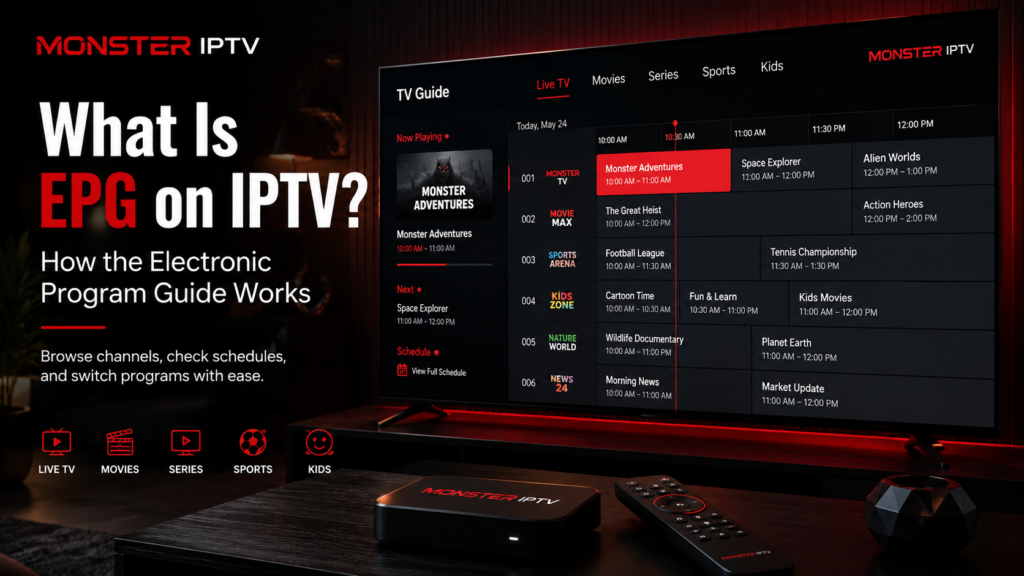
If you are wondering what is EPG on IPTV, EPG stands for Electronic Program Guide. It is the on-screen television schedule that shows what is currently playing, what comes next, programme start and end times, and sometimes descriptions or other programme information.
An EPG does not normally contain the television stream itself. Instead, it provides schedule data that an IPTV player matches with channels from your playlist or account. When everything is configured correctly, the result is a familiar TV guide that makes live television much easier to browse.
What Does EPG Mean on IPTV?
An Electronic Program Guide is essentially the digital version of a traditional television listings guide.
Instead of seeing only a list of channel names, an IPTV player with EPG support can show information such as:
- current programme
- next programme
- start and finish times
- programme title
- description
- episode information, when supplied
- programme categories
- scheduled programmes for later in the day
The amount of information available depends on the EPG data source and what the IPTV player can display.
For IPTV users in Sweden, an EPG can be especially useful when navigating Swedish and Nordic live TV because it reduces the need to open individual channels simply to discover what is currently showing.
How Does EPG Work With IPTV?
An IPTV setup normally contains several separate components.
The stream carries the actual video and audio. The playlist or account tells the player which streams are available. The EPG supplies programme schedule information.
A simplified process looks like this:
- Your IPTV player loads the available channels.
- It retrieves EPG information from a compatible source.
- The player matches schedule entries with the correct channels.
- It displays the programme data in a guide or timeline.
- The information is refreshed when updated guide data becomes available.
One common format for television listings is XMLTV. The XMLTV Project describes XMLTV as an XML-based format for storing TV listings, with separate records for channels and programmes. Programme records can contain details such as titles, descriptions, broadcast times, and other metadata.
This is why a channel can play perfectly even when its programme guide is empty. The stream and the EPG are different sources of information.
IPTV Playlist vs EPG: What Is the Difference?
An IPTV playlist and an EPG work together, but they perform different jobs.
An M3U playlist can contain channel names, stream URLs, groups, and identifiers. The EPG contains the programme schedule associated with those channels.
Think of it this way:
Playlist: “This channel exists, and this is where its stream is located.”
EPG: “This is what that channel is showing at 20:00 tonight.”
You can therefore have:
- channels without EPG information
- EPG information without a correctly matched channel
- working streams with incorrect programme titles
- correctly matched channels and a complete TV guide
Understanding this distinction makes troubleshooting much easier.
How Does XMLTV Work With an IPTV EPG?
XMLTV is one of the common formats used to exchange television schedule information.
According to the XMLTV Project, an XMLTV document can contain channel records as well as programme records with broadcast times and programme metadata.
A simplified guide might associate a particular channel identifier with scheduled programmes.
The IPTV player then needs a way to connect the playlist channel with the correct EPG channel.
In M3U-based setups, this is often done using an identifier such as tvg-id. The value in the playlist needs to correspond with the identifier used by the programme guide.
For example, if the playlist identifies a channel as:
example-channel.se
but the EPG uses:
exampletv.se
the player may fail to match them automatically.
The stream could still work, but the guide might show “No information”.
How to Add an EPG to an IPTV Player
The setup method depends on your IPTV app.
Some account-based configurations can load programme information automatically. Other players allow you to enter a separate EPG or XMLTV URL.
A typical manual setup looks like this:
- Open your IPTV player.
- Go to playlist, account, or EPG settings.
- Find an option such as “EPG Source”, “TV Guide” or “XMLTV”.
- Enter the EPG URL supplied for your setup.
- Save the settings.
- Refresh or update the programme guide.
- Restart the player if necessary.
Do not assume every IPTV app uses the same menu names or configuration method.
Monster IPTV provides separate IPTV installation guides for different players and devices, which can be more useful than following generic instructions intended for another platform.
Why Does My IPTV EPG Say “No Information”?
A missing guide does not automatically mean your IPTV subscription or internet connection has failed.
Several different issues can cause blank EPG entries.
The EPG Source Did Not Load
If the player cannot retrieve the XMLTV or guide data, the channel list may still appear while programme information remains empty.
Check that the EPG URL is complete and that the player has successfully refreshed it.
The Channel IDs Do Not Match
This is one of the most important technical causes.
The playlist and EPG may both be valid, but if their channel identifiers do not correspond, the player may not know which programme schedule belongs to which stream.
The Guide Has Not Refreshed
EPG information changes constantly because television schedules move forward every day.
Some players cache guide information. If the data appears outdated, use the app’s EPG refresh or update function.
Only Some Channels Have EPG Data
An EPG source may not contain programme listings for every channel in a playlist.
A partially populated guide can therefore be a data-coverage issue rather than a problem with the player.

Why Is My EPG Showing the Wrong Time in Sweden?
If programme information appears but every programme starts one or two hours too early or too late, check the device and application time-zone settings.
For users in Sweden, the device should normally be configured for the correct Swedish local time. Time-zone handling becomes especially important around seasonal clock changes.
An incorrect offset can result in a guide that contains the correct programmes but displays them at the wrong times.
Before editing individual channels, check:
- TV or device date and time
- automatic time-zone settings
- IPTV player’s EPG time offset
- daylight-saving configuration
- whether a manual offset was previously added
Avoid applying a manual offset unless it is actually necessary. Otherwise, the guide may become incorrect when seasonal time changes occur.
Does EPG Affect IPTV Streaming Quality?
No. EPG data and video quality are separate.
The programme guide can tell you what is playing, but it does not determine whether a stream is HD, Full HD, or 4K, and it does not increase the bitrate of a channel.
Likewise, a missing EPG does not normally cause buffering.
Streaming problems are more likely to involve the stream source, internet connection, Wi-Fi, player, device, or network conditions.
If channels play normally but the guide is blank, focus on the EPG configuration rather than changing network settings.
EPG, Catch-Up and Recording
EPG information can also support more advanced IPTV features when the player and service provide them.
For example, some players use programme-guide information to help users:
- schedule recordings
- identify past programmes
- navigate catch-up television
- search for upcoming programmes
- select content from a timeline
However, an EPG does not automatically mean that recording or catch-up is available.
The programme guide only supplies schedule information. The IPTV player, service, and device must separately support those functions.
This distinction is important when comparing IPTV applications. Two players may display the same channels while offering very different ways to use the EPG.
What Makes a Good IPTV EPG?
A useful EPG should be accurate, easy to navigate, and correctly matched to the channel lineup.
Look for:
- correct Swedish local times
- accurate programme titles
- reliable channel matching
- useful descriptions
- quick loading
- regular data updates
- clear now-and-next information
- an easy-to-read grid on TV screens
The interface also matters. A detailed EPG may feel convenient on an Android TV or Smart TV but cramped on a phone if the application has not been designed well for smaller screens.
Your choice of IPTV player therefore affects how EPG data is presented even when the underlying schedule information is identical.
For general questions about devices and IPTV configuration, the Monster IPTV FAQ provides additional setup information.
FAQ
What is EPG on IPTV?
EPG means Electronic Program Guide. It displays television schedules inside an IPTV player, including information about what is currently playing and what is scheduled next.
Is EPG the same as an M3U playlist?
No. An M3U playlist primarily identifies channels and stream locations. An EPG provides programme schedule information that can be matched to those channels.
What is an EPG URL?
An EPG URL is an address from which a compatible IPTV player can retrieve programme-guide data. XMLTV is one widely used format for television listings.
Why is my IPTV working but EPG is not?
The stream and guide are separate. The problem may involve the EPG URL, channel matching, cached data, time settings, or missing schedule information.
Does EPG use XMLTV?
XMLTV is commonly used for EPG data. The format supports channel information and individual programme listings with broadcast times and programme metadata.
Can an IPTV player work without EPG?
Yes. Channels can still play without programme-guide information. You will simply have less information about what is currently showing and what comes next.
Conclusion
An EPG turns a basic IPTV channel list into a more familiar television experience by adding programme schedules, titles, times, and other guide information. The key point when learning what is EPG on IPTV is that the guide, playlist, and stream are separate components. If channels work but the guide does not, check the EPG source, channel matching, refresh status, and Swedish time settings before changing the streaming configuration. For more information about IPTV setup and compatible viewing options, visit Monster IPTV.
